Why I built it
A lot of my work is supporting on-site PCs over remote access. When an on-site worker plugs one of our in-house router products into the PC, the routing table changes and remote support can no longer connect.
With no way in remotely, the routing table has to be fixed on site,
and the workers, naturally, do not know Windows commands like route print or route delete.
Reading commands out one character at a time over a call, first on Skype and now on Teams, only went so far.
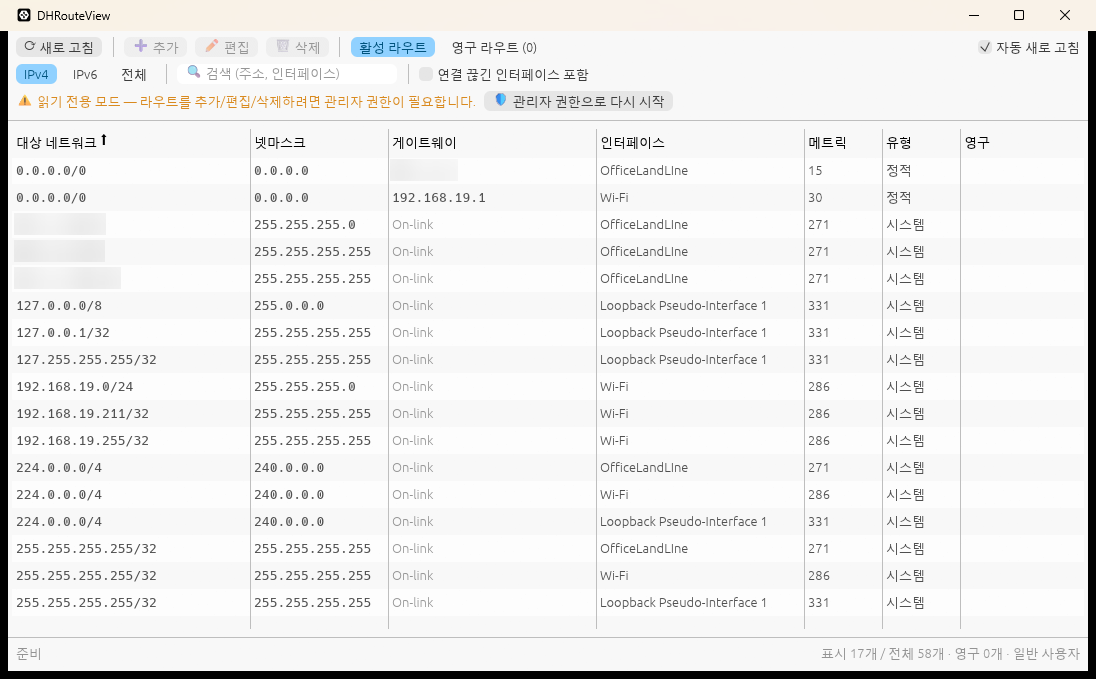
So, to prevent that situation, I built a small GUI tool that shows the routing table as a list and lets you add, edit and delete routes on screen without knowing any commands.
Features
- IPv4 / IPv6 routing table view: column sorting and filtering
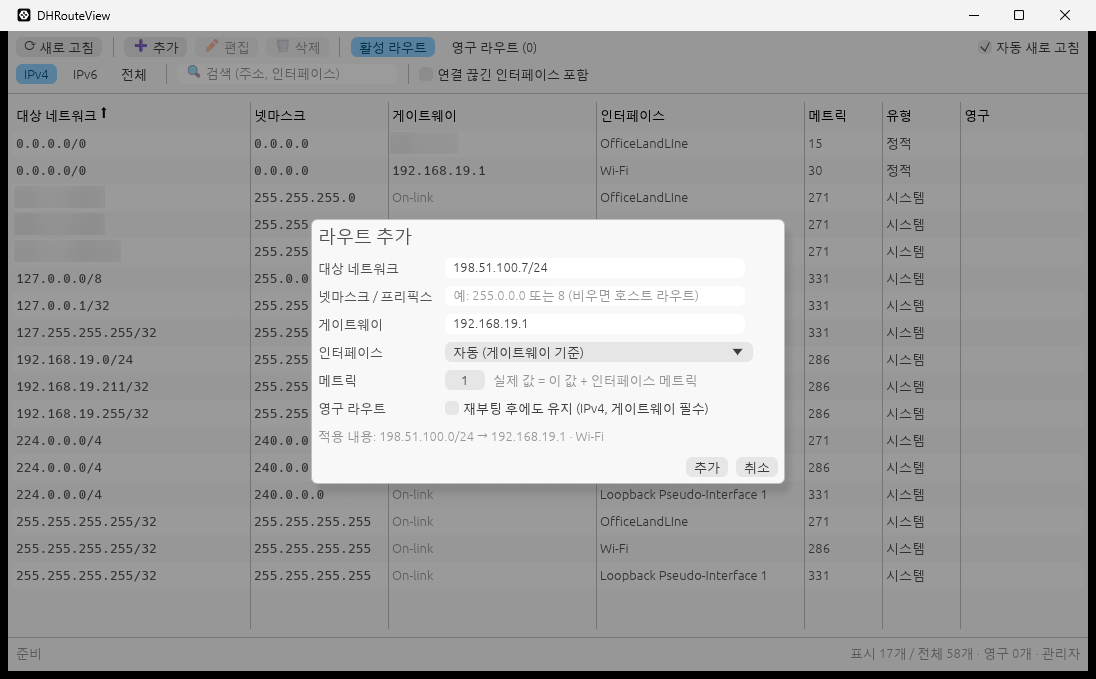
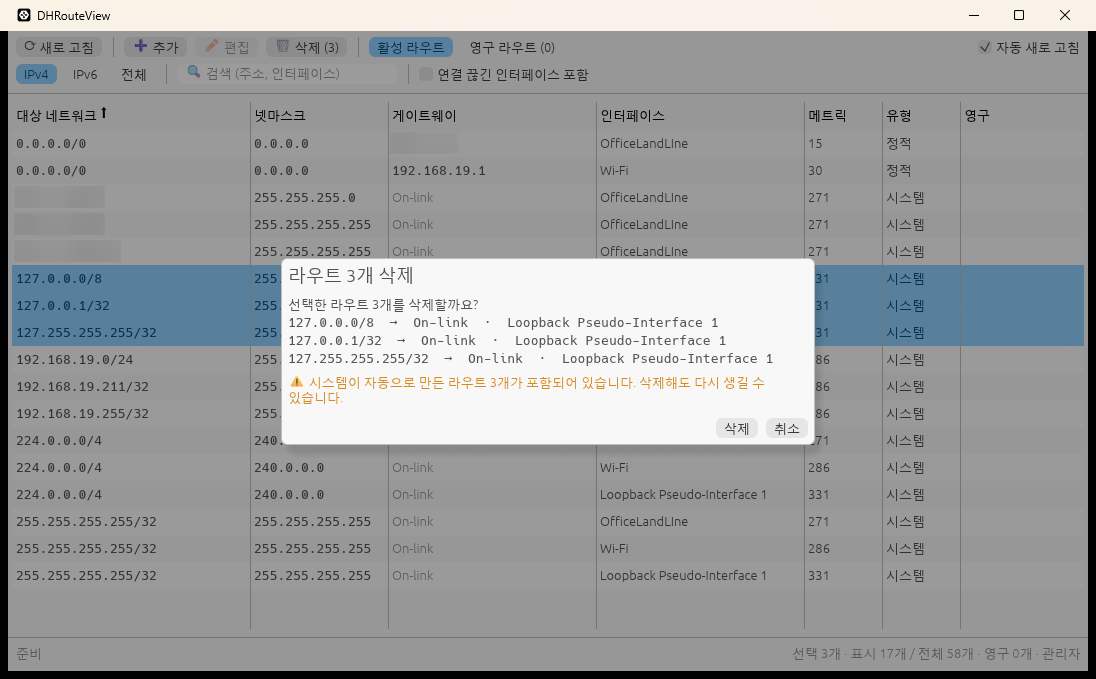
- Add / edit / delete routes
- Enter a gateway and the interface on the same subnet is selected automatically
- Host bits in the destination are cleared to the network address, with a preview of what will be applied
- Multi-select and bulk delete: Explorer-style Ctrl+click, Shift+click, Ctrl+A, Esc and Delete
- Persistent routes: implemented on the same registry store as
route -p(IPv4 routes with a gateway). I have not yet confirmed myself that they are applied after a reboot. - Copy as command: from the right-click menu, copy the selected routes as the commands that add the same routes
(
route addfor IPv4,netshfor IPv6) - Routes on disconnected interfaces are hidden by default, as in
route print, and a checkbox shows them
What I paid attention to
1. No route.exe
Running route.exe and parsing its output is simple, but the output text changes with the Windows display language,
and the cause of a failure is hard to pin down. So the tool calls the Windows IP Helper API directly.
| Action | API |
|---|---|
| List | GetIpForwardTable2 |
| Add | CreateIpForwardEntry2 |
| Change metric | SetIpForwardEntry2 |
| Delete | DeleteIpForwardEntry2 |
It works regardless of locale, and when a call fails it gets the Win32 error code directly and can show the cause along with the number.
2. Metrics that look different from route print
The Metric the API returns is the route metric, while the value route print shows is
route metric + interface metric. Showing the raw value would not match route print and would confuse people,
so the list shows the sum and the add/edit form takes the route metric.
3. Edits that change the key are “add, then delete”
If the destination (including the netmask), gateway and interface stay the same and only the metric changes, the tool uses SetIpForwardEntry2.
If any of them changes, it adds the new route first and deletes the old one only if that succeeded.
That way a failure partway through never leaves you without the original route.
4. Administrator rights only when needed
Viewing works with normal rights, so the tool does not raise a UAC prompt every time it starts. To change routes, the “Restart as administrator” button in the app (관리자 권한으로 다시 시작) relaunches it through UAC.
5. The “On-link” label
At first, routes without a gateway were labelled “연결됨 (on-link)” (“connected (on-link)”), but rows on disconnected interfaces also said “connected”, which was confusing. On-link has nothing to do with link state, so the label is now just “On-link”, and rows on disconnected interfaces are dimmed with “(연결 끊김)” (“disconnected”) next to the interface name.
Development environment
- Language: Rust (edition 2024, MSVC toolchain)
- GUI: eframe / egui 0.37 + egui_extras (tables)
- Windows API: the
windows0.62 crate,windows-registryfor the registry - Size: about 2,100 lines (
src/*.rs), 16 tests (14 pure-logic tests + 2 smoke tests that only read the live routing table and registry) - UI language: Korean
- License: MIT
cargo build --release    # target\release\dhrouteview.exe
cargo test
Download
- Repository: https://github.com/pdh0085/DHRouteView
- Release v0.1.0: https://github.com/pdh0085/DHRouteView/releases/tag/v0.1.0
DHRouteView.exe: a single exe that runs without an installerDHRouteView-v0.1.0-windows-x64.zip: the exe + LICENSE + README
The exe is not code-signed, so Windows SmartScreen may warn the first time you run it. Changing routes requires administrator rights.
Wrapping up
For a developer this is a few lines of commands, but for an on-site worker who does not know the commands it is not easy. Since routes can now be checked and cleaned up on screen in a few clicks, I expect it to make it much easier to deal with remote support dropping. Next, I am thinking of adding features such as exporting and importing the route list.